nShift Checkout for Shopify

Delivery choice that converts, powered by rules you control


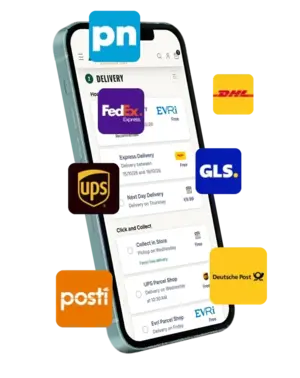
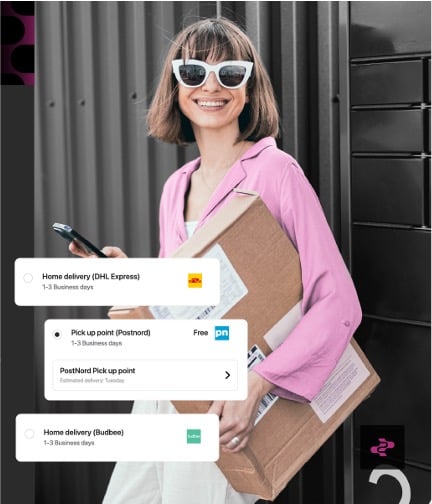
nShift Checkout for Shopify lets you show home delivery, parcel lockers, parcel shops, and express options right inside Shopify’s native checkout. You set the rules: by market, geography, cart value, product type. Customers see lead times and pickup-point details before they commit. No custom code required.

Checkout-badges-no-2
flying-tiger-copenhagen-logo-200x400
dermosil-logo-400x200
stockmann-logo-400x200-fullwidth
stadium-logo-400x200
smeg-logo-400x200
laithwaites-logo-400x200-black
vita-logo-400x200

The delivery choice that's costing you sales

Limited delivery choices can undo a confident shopper. When checkout does not reflect how people actually want to receive parcels, including PUDO options, conversion drops and carts get abandoned.

That problem gets harder to ignore as you grow across markets. Delivery expectations vary, and a simple Shopify shipping setup can soon turn into patchworks of carrier logic, hardcoded rules, and developer tickets.

You need delivery choice that feels local now, without signing up for a rebuild later.


The inability for our shoppers to select their preferred PUDO point at checkout was a big issue in delivering a positive customer experience.

Sander van Enschot

Head of Digital Operations, Flying Tiger Copenhagen

What is nShift Checkout for Shopify?

nShift Checkout for Shopify connects your Shopify store to nShift Checkout and returns the delivery options you want to show at checkout, based on configured services and rules. Shopify displays those options in its native checkout, while you stay in control of what appears, what it costs, and when it is available, with guidance from nShift Companion as you configure your setup.

badge-shopify-app-store-light


Show delivery options in Shopify’s native checkout

Control delivery logic through configured services and rules

Tailor what appears by market, geography, cart contents, product attributes, and customer data

Save the selected option on the order for downstream completion

What you can do at launch

These capabilities are live today for Shopify Grow, Advanced, and Plus stores.
icon-parcel-list-pink

PUDO and local delivery options

Show PUDO options including parcel lockers and parcel shops, alongside home delivery and express (where supported) as selectable options at checkout. 

icon-cog-pink

Rules by market and cart logic

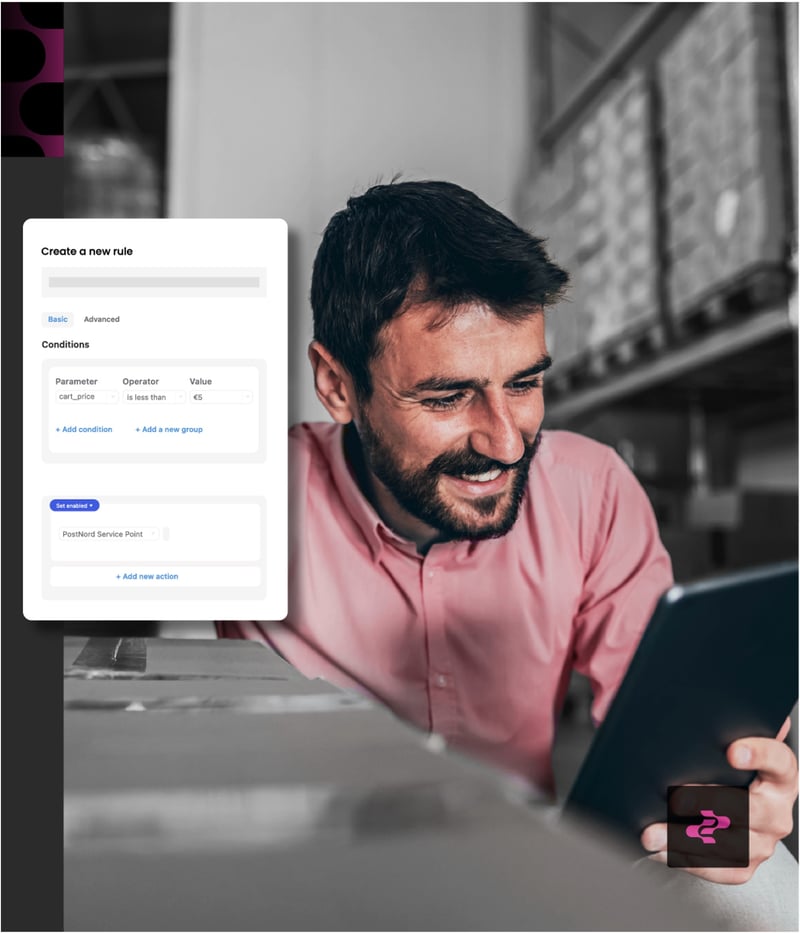
Control what appears at checkout with rules based on market, geography, cart value, product attributes, and customer data. Change the rules without developer time.

icon-calendar-pink

Lead times and clearer promises

Display estimated delivery times where available. When customers can weigh speed against convenience, they commit with more confidence.

icon-network-pink

Downstream order handoff

The selected delivery option is saved on the order and handed off as a placeholder shipment, ready for downstream completion in nShift Delivery, Ship, or Transsmart.

Component icons-all_Checkout-white

Over nine in ten shoppers abandon the cart when their preferred delivery option is not available. (DHL)

Who this is for

icon-reliable-connectivity

You have outgrown basic Shopify shipping

A single “standard delivery” line no longer reflects how your customers want to receive orders. You need lockers, parcel shops, and express, controlled by rules.

icon_Delivery

You sell across multiple markets

Delivery norms differ by country. You need one system that adapts by market, not parallel setups for each one.

icon-cog-black

You want to stop rebuilding delivery logic

Every new market or peak season should not mean another custom build. You want a rules-based foundation that scales with you.

icon-network-black

You need checkout and fulfillment to connect

The delivery option selected at checkout should flow straight into your shipping workflow, without re-entry or gaps.

How it works

Simple for the shopper. More control for your team.
icon-multi-carrier-shipping-software-1
Install
Find nShift Checkout in the Shopify App Store and install it on your store.
icon-multi-carrier-shipping-software-2
Connect
Link the app to your nShift Checkout setup in the nShift Portal.
icon-multi-carrier-shipping-software-3
Configure

Set up delivery services, pricing, and rules, with help from nShift Companion.

icon-multi-carrier-shipping-software-4
Show rates
Shopify displays the delivery options returned by nShift at checkout.
icon-multi-carrier-shipping-software-5
Hand off
The selected option is saved to the order and passed downstream for fulfilment.
flying-tiger-copenhagen-logo-400x200-inverted

20% increase in online conversion rates

Flying Tiger Copenhagen saw a 20% boost in conversion rates after improving delivery choice with nShift Checkout.

How nShift Checkout extends Shopify shipping


Standard Shopify shipping

nShift Checkout for Shopify

Delivery options

Flat rate, weight-based, or Shopify Shipping carriers

Home delivery, lockers, parcel shops, express. Access to 1,000+ carriers through the nShift network

Market-level rules

Zone-based profiles with weight/price conditions

Conditions by country, postal code, cart value, product type, customer data

Adding a carrier

Install a separate app or custom code

Configuration in nShift backoffice, no code

Operational control

Managed in Shopify admin and individual carrier apps

Rules, pricing, and services managed in one place. Ops teams change settings without developer involvement

nshift-shopify-checkout-2
scandinavian-luxury-group-logo-400x200-inverted-1

20% fewer carts abandoned at checkout

Scandinavian Luxury Group reduced cart abandonment by 20%, grew conversion by 25%, and lifted order value by 28%.

Ready to boost your checkout?


Talk to our team about setting up nShift Checkout for your Shopify store. We’ll help you assess fit, connect your setup, and configure your first delivery rules.

nShift Checkout for Shopify is a strong fit for merchants using Shopify Grow, Advanced, or Plus, with access to nShift Checkout in the nShift Portal.

Not sure whether you already have everything in place? Fill in the form and we’ll help you work out the next step.

badge-shopify-app-store-dark


Part of the nShift platform

nShift Checkout connects into a wider delivery management platform, helping teams carry better delivery choice into downstream execution and post-purchase experience.

Learn more about nShift Checkout →

Frequently asked questions about nShift Checkout for Shopify

What is nShift Checkout for Shopify?

It is a Shopify app that lets merchants display rules-based delivery options directly in Shopify checkout. It connects Shopify to nShift Checkout and returns the delivery options you want to show, based on configured services and rules.

Does it work in Shopify’s native checkout?

Yes. nShift Checkout delivers shipping options through Shopify’s CarrierService API. Shopify presents them in its native checkout design. There is no external or custom checkout UI.

Do I need an nShift agreement?

Yes. You need an active agreement with nShift for the nShift Checkout product and at least one configured checkout connection in the nShift Portal.

How do I get started?

Install the app from the Shopify App Store, connect your nShift credentials, select your checkout connection, and add nShift Checkout as a rate provider in your Shopify shipping settings. If you need help, use the form on this page or contact your nShift account team.

What delivery options can I show?

At launch, you can offer home delivery, parcel lockers, parcel shops, and express (where supported by your configured carrier services). Each option can include a title, description, price, and estimated delivery time. Pickup-point services can also include the location name, address, and distance.

Can customers choose PUDO options at checkout?

Yes. Where supported and configured, nShift Checkout for Shopify can show PUDO options such as parcel shops and parcel lockers directly in Shopify checkout. For pickup-point services, customers can also see details such as location name, address, distance, and estimated delivery time.

Can I control options by market or cart conditions?

Yes. nShift Checkout supports rules by market, geography, cart value, product attributes, and customer data. You configure these rules in the nShift Checkout back office without developer involvement.

Can I show ETAs and pickup-point details?

Yes, where available based on your configured services and carrier data. Lead times are displayed alongside each option at checkout.

What if I have multiple warehouses?

If you have multiple fulfillment centers set up in Shopify’s shipping and delivery settings, nShift Checkout returns shipping rates for each warehouse separately. Customers can select different delivery options for each shipment.