


Carrier invoice audit software

Recover the overcharges in your freight invoices

nShift Audit reads carrier invoices in the format they arrive and checks every line against your contract and your shipment data. Overcharges become disputes with the evidence attached, ready to send. Upload your first invoice and see structured results within minutes.

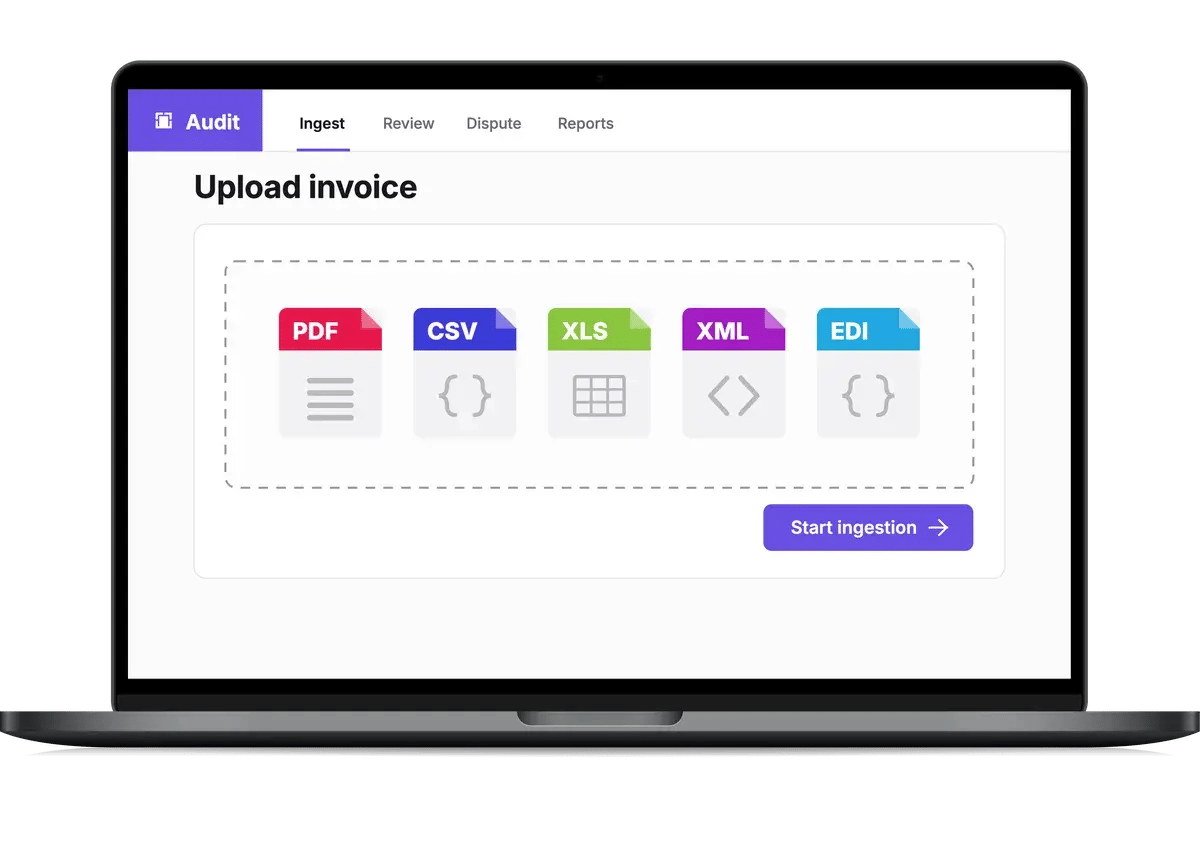
nShift Audit upload screen with PDF, CSV, Excel, XML and EDI invoice formats
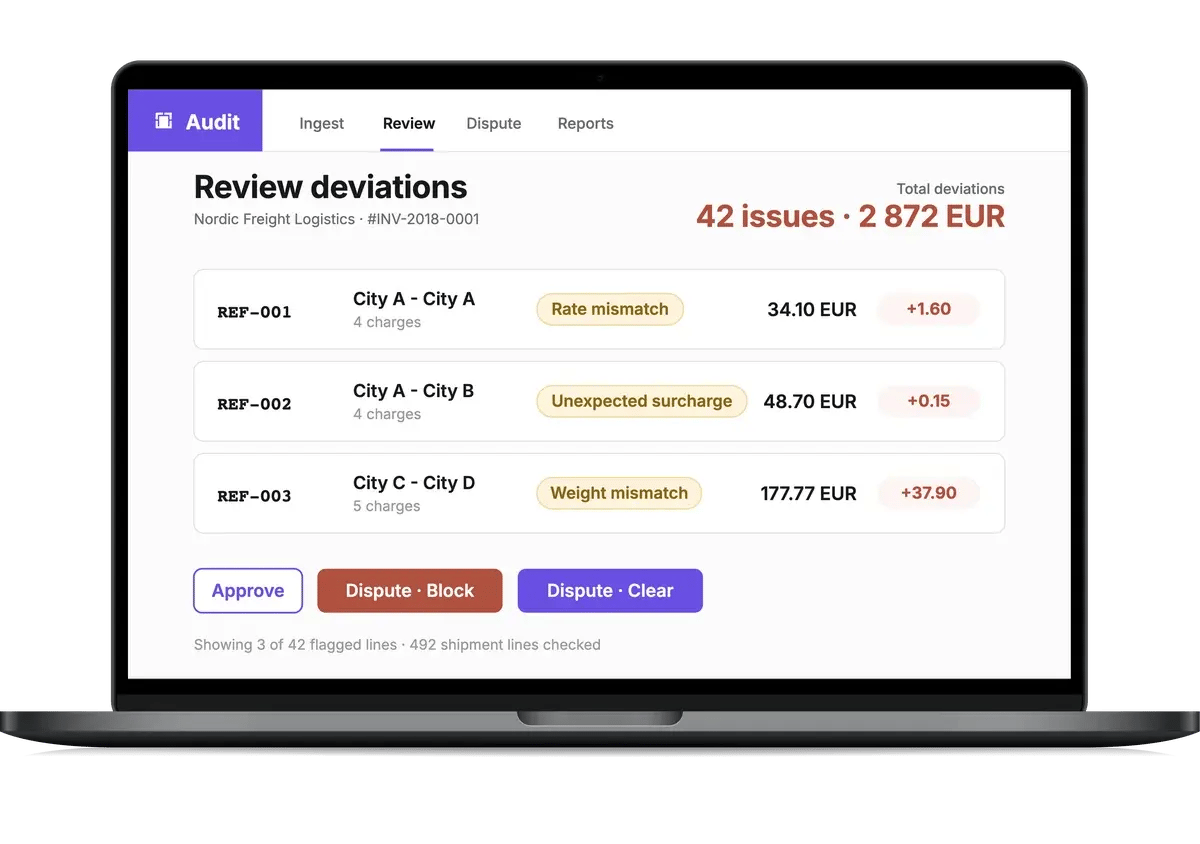
nShift Audit review screen showing flagged invoice lines with the reason and amount for each
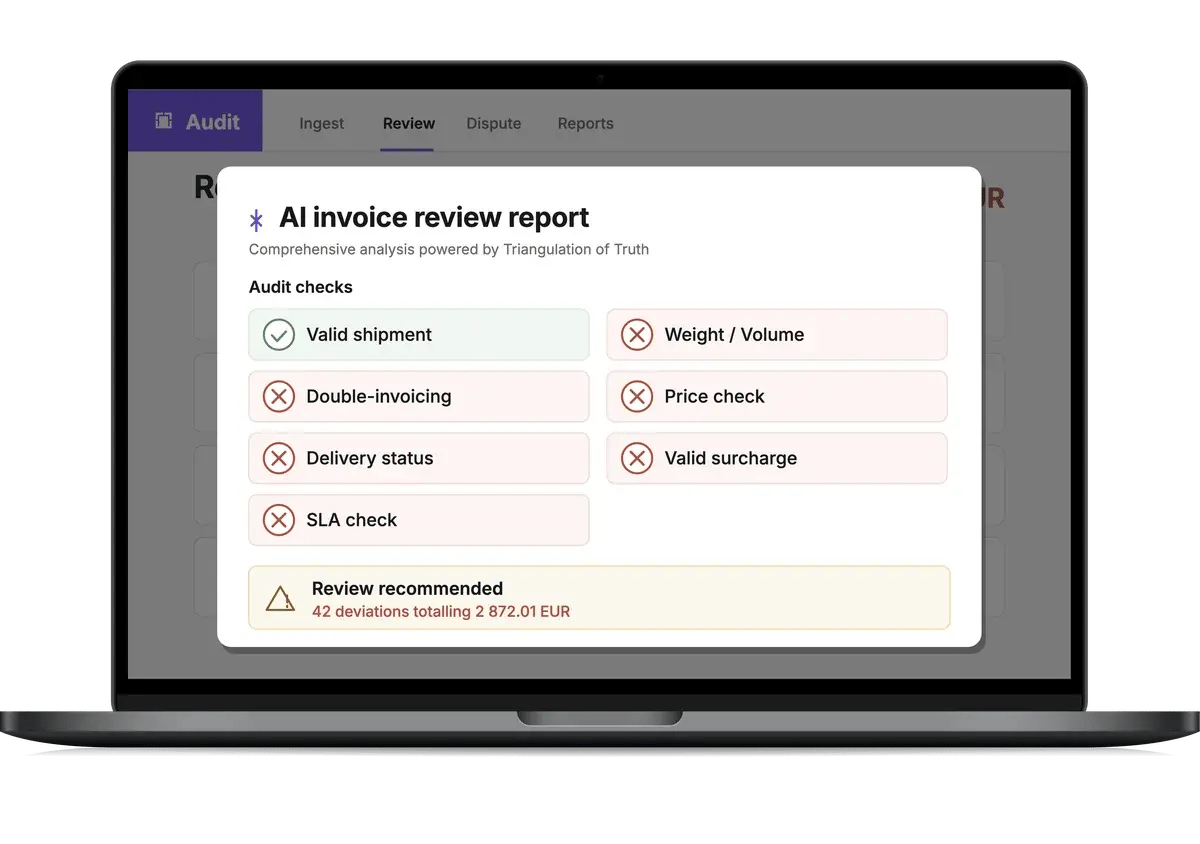
nShift Audit AI invoice review report showing the seven deviation checks
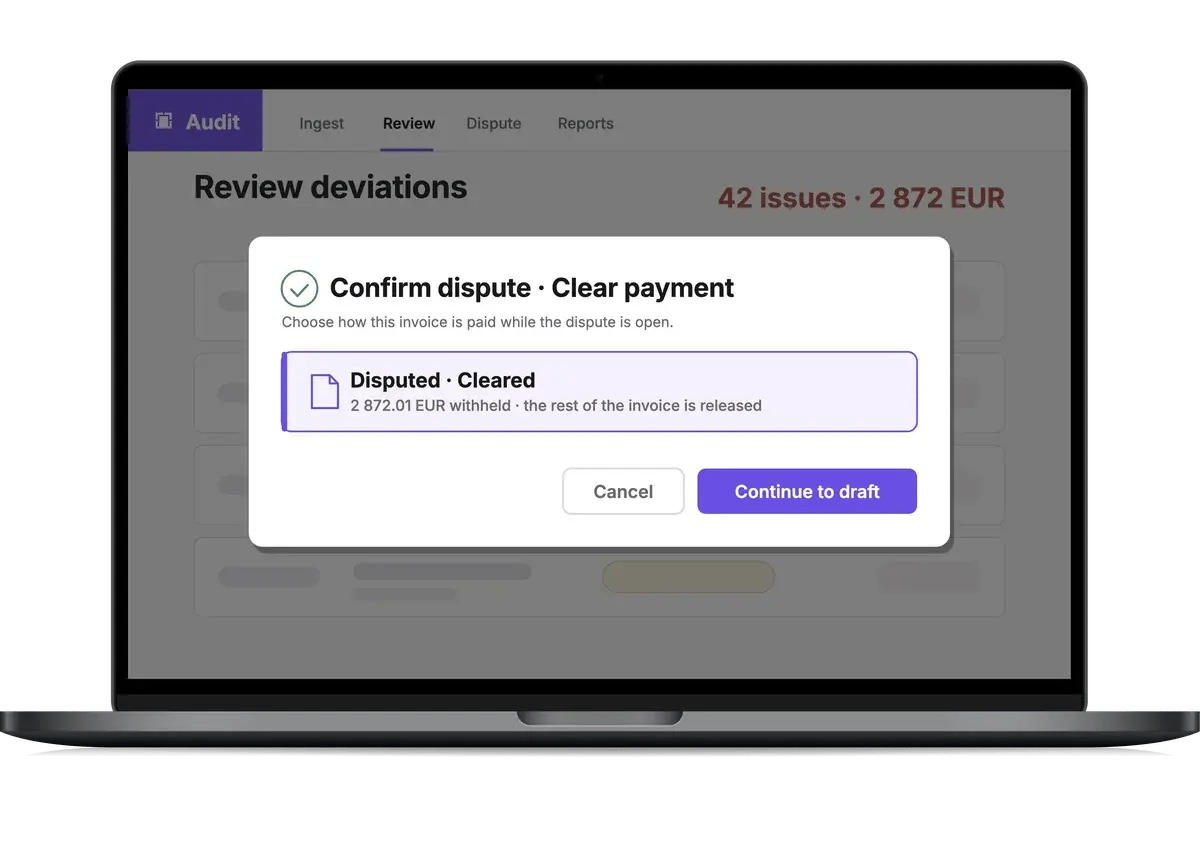
nShift Audit confirm dispute dialog clearing the rest of the invoice for payment

A correct rate can still be the wrong charge

A carrier can charge the contracted rate for the wrong weight, a cancelled shipment, or a service it missed.

nShift Audit checks every invoice line against your tariff and what actually shipped.

See what holds up. Challenge what doesn’t.

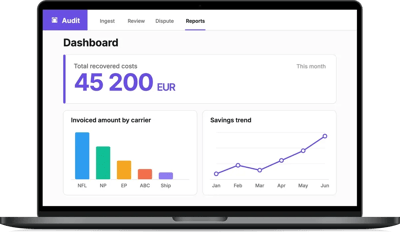
nShift Audit dashboard showing total recovered costs, invoiced amount by carrier and savings trend

What is nShift Audit?

nShift Audit is AI-powered carrier invoice audit and recovery software. It reads raw carrier invoices, checks every line against your contracted tariff and shipment record, and builds disputes with the evidence attached.

Already ship with nShift? Your shipment data is there. If not, connect your shipment data through the nShift API, and upload your invoices.

icon-audit-white

Start without a mapping project

Upload the first invoice. Validate the format once. No carrier-specific rules, templates or mapping.

icon-audit-white

Check the whole invoice

Match each charge to your tariff and the shipment behind it. Largest deviations first.

icon-audit-white

Recover the money

Find the overcharges, dispute them, and track the recovery.

icon-audit-white

Put evidence behind every dispute

Send the dispute with the shipment evidence attached. Keep the whole exchange in one thread.

ROI calculator

Put your freight spend in. See the range you could recover.

  • 1 in 5 freight invoices is inaccurate.
  • 3 in 4 companies check them by hand, or not at all.
  • Audits recover 3 to 7% of freight spend.

Enter your annual freight spend. The recoverable overcharge is calculated at industry benchmark rates.

Journal of Commerce freight benchmark study; nShift customer research, 2026; recovery rates from DataIntelo, MarketIntelo, Forrester and Drewry.

The benchmark range is not a forecast of your recovery.

€1M€50M

Recoverable overcharge

€150,000to€350,000

€150,000conservative
€250,000mid-point
€350,000optimistic

Get a calculation tailored to your operation.

Book a demo

Customer stories

nShift customers already seeing the value

Mobile Climate Control logo

Verified
transport costs

for Mobile Climate Control’s logistics and finance teams, replacing manual invoice checks against agreed rates
Papyrus Supplies logo

Less
overbilling

for Papyrus Supplies, shipping hundreds of thousands of parcels a year on nShift Ship
Glamox logo

Insight into
freight costs

for Glamox: invoice reconciliation, plus a better foundation for negotiating with carriers
Ovako logo

Fewer invoice
discrepancies

at Ovako, where teams see what each shipment costs across 20 carriers

Product tour

Watch a carrier invoice go from upload to recovered cost

This AI-assisted video tour follows one invoice through seven checks, a dispute and recovery.

icon-integrations-black

Seven deviation checks on every invoice

Valid shipment, double invoicing, delivery status, SLA, weight and volume, price, valid surcharge. Every invoice is checked against all seven before anyone opens it.

portal-icon2

Auto-approval for small deviations

Set a threshold and deviations under it are approved automatically. Accept expected surcharges so they do not enter a dispute. You review only the deviations that were not auto-approved.

icon-network-black

Spend and surcharges across every carrier, in one format

Spend by carrier, service, lane and month, plus surcharge frequency and annual cost, normalized from every carrier invoice into one dataset. Use the numbers in your next carrier negotiation.

icon-product-companion-app-black-2

Outliers flagged beyond the rules

The seven checks catch defined deviations. Outlier flags compare cost per kilogram, surcharge ratio, weight and zero-amount charges against your own averages. A surcharge at 310% of base rate against a 56% average is flagged as an outlier.

icon-configure-smart-rules-black

Savings dashboard with recovery rate

Recovered costs, the savings trend, open disputes and your auto-approval rate, in one view.

icon-app-black

Invoices in by upload, email, FTP or API

Send them the way your carriers already send them to you. No template, no mapping.

How carrier invoice audit works

Step 1 · Ingest

The AI reads the invoice as it comes

PDF with text, CSV, Excel, XML or EDI. The engine identifies the layout without a template and normalizes every charge line into one standard format. It checks that the invoice adds up internally, and matches credit notes to the invoices they correct.

Step 2 · Review

Every flagged line comes with its reason

Open an invoice and the report shows which of the seven checks failed, and where. Filter to deviations only, or sort by deviation size to see the biggest first. Each line carries a plain explanation of what looks wrong: the rate applied against the rate agreed, the weight billed against the weight shipped. Accept the deviations you expected. Review the remaining deviations and decide what to dispute.

Step 3 · Dispute

Choose how to close the invoice

Approve it all, dispute and hold payment, or dispute the flagged lines and clear the rest, so the carrier is paid on time and the dispute runs alongside. The platform prepares the dispute with the evidence attached; send it to the carrier from the platform or download it as a PDF to send yourself. The whole exchange stays in one thread until you mark it resolved.

Live webinar

The invoice nobody checks

23 September, 12pm BST • 1pm CEST • Live • 30 mins

Join us as we analyze a complex carrier invoice with nShift Audit and uncover where freight spend is leaking, what caused it, and what can be recovered.

Title-banner-Solved-Audit

Where the manual invoice audit stops

nShift Audit checks the invoice against both the contract and the shipment record.

Manual invoice checking With nShift Audit
Checked againstYour contractYour contract and shipment record
CoverageSelected linesEvery line, largest deviation first
New carrierA mapping projectValidate the first invoice
Raising a disputeSpreadsheet, email, evidence by handEvidence attached, sent from the platform
Paying while you disputeHold the invoice or pay the chargeDispute the line, clear the invoice
What freight costs youEach carrier’s portal exportSpend and surcharges, one view
nShift Audit icon

What logistics, finance, IT, security and procurement ask about nShift Audit

Get the buyer evaluation pack.

Book a demo shaped around your operation


Tell us your carriers, formats and freight spend, and we will walk through how nShift Audit would run on your invoices.

In 30 minutes we will show you:

  • a raw carrier invoice read with no per-carrier setup, in the format it arrives in

  • the seven checks running, deviations sorted largest first

  • a flagged charge turned into a dispute, evidence attached

  • what a recovery range looks like at your annual freight spend


Part of the full journey

nShift Audit uses shipment data from the same platform that runs checkout, shipping, tracking and returns. That shipment record becomes evidence in the invoice audit.

Discover the platform →

Delivery & experience management platformnShift platform: products, AI and data layers, carrier network and connected systems.3PL/4PLCXECOMMERCEERPLOGISTICSMARKETPLACESOMSPAYMENTSWMS3PL/4PLCXECOMMERCEERPLOGISTICSMARKETPLACESOMSPAYMENTSWMSCarrier networkDelivery & experience management platform Checkout Deliver Track Return AuditData fabricAgentic AIDelivery & experience management platformCheckoutDeliverTrackReturnAudit3PL/4PLCXECOMMERCEERPLOGISTICSMARKETPLACESOMSPAYMENTSWMSAgentic AIData fabricCarrier network3PL/4PLCXECOMMERCEERPLOGISTICSMARKETPLACESOMSPAYMENTSWMS

Frequently asked questions about nShift Audit

What logistics, finance and IT ask before they bring carrier invoices into nShift Audit.

Have a question these do not cover? Bring it to a demo, with a recent invoice if you have one.

Book a demo →

What is nShift Audit?

nShift Audit is carrier invoice audit software that reads raw carrier invoices as PDF, CSV, Excel, XML or EDI, checks every line against contracted rates and shipment data, and builds disputes for overcharges inside the nShift delivery management platform.

What is a freight invoice audit?

A freight invoice audit verifies that the invoice matches what was agreed and what shipped: rates, surcharges, weights and service levels. Because freight has no purchase order, it needs dedicated matching against contracts and shipment records rather than standard accounts-payable checks.

Which invoice formats and carriers does nShift Audit support?

nShift Audit ingests raw carrier invoices as PDF with text, CSV, Excel, XML and EDI; image-only scans are not supported. The AI identifies each format’s structure without pre-built templates. You validate the first invoice from a new format, and the system automates from there.

What does a shipping invoice audit check?

nShift Audit runs seven checks on every invoice line: valid shipment (the line matches a real shipment), double invoicing (the shipment was not billed before), delivery status (the shipment was delivered), SLA (delivery met the contracted service level), weight and volume (billed against what shipped), price (invoiced amount against the expected cost), and valid surcharge (the surcharge breakdown reconciles). Every flagged line comes with a written explanation of why.

How does freight invoice verification use three-way matching?

Three-way matching verifies the invoice against the contracted tariff and the shipment record. nShift Audit uses shipment execution data from the nShift platform as the third source, catching errors a rate check alone misses.

Do I need other nShift products to use nShift Audit?

Your shipments need to be in nShift Portal: automatically from nShift Ship, Delivery, Transsmart or TMS, or uploaded through the Shipment Data API. Expected prices come from a rate card configured in nShift’s Freight Rate Calculation service. Without one, five of the seven checks still run, and you still get normalized invoice data, the Invoice Explorer, dashboards and export.