

Returns management system

Self-service returns,
on your terms


nShift Returns is returns management software for the whole journey. Customers start a return in your branded portal. You set fees and return windows by rule, while refunds, exchanges and restocking move through one connected flow.
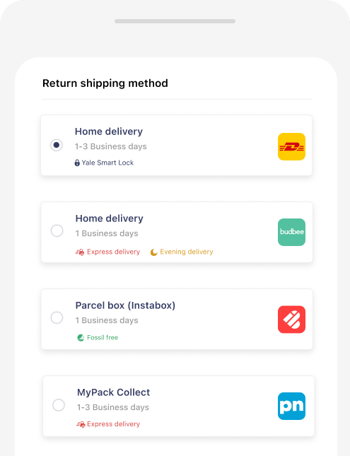
nShift Returns portal on a phone, showing the return shipping methods a customer can choose from
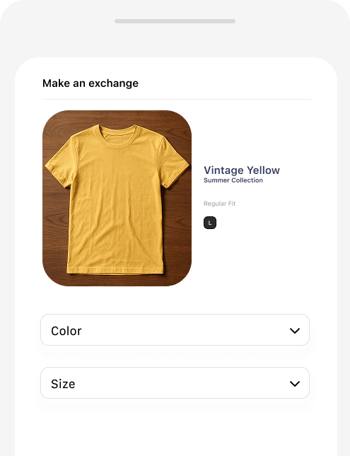
nShift Returns portal on a phone, where a customer exchanges a T-shirt for another color or size

Returns slowing you down?

Poor returns cost time, margin, and loyalty: 7 in 10 UK shoppers would shop less, or stop buying altogether, after a poor return (IMRG for nShift, 2026). Delayed refunds, lost parcels, and manual processes frustrate everyone.

With nShift Returns, a returns platform built for ecommerce, customers self-serve while refunds, exchanges and warehouse steps stay connected. You also get the data to understand what’s causing returns in the first place.

What was a historical pain point for the company and our customers has been changed into something that adds real value.

Robin Visser

Omni Channel Business Development Manager, Hunkemöller

nShift named a Representative Provider in the 2025 Gartner® Innovation Insight: Postpurchase Delivery Experience Solutions Report.


Gartner logo

Make returns easier for customers and teams

Returns portal icon

Your customers

Access a mobile-friendly portal for easy returns.

Returns warehouse icon

Your operations

Manage all return requests in one dashboard and automate refunds. 

Returns insights icon

Your business

Get clear data on why returns happen and use it to fix upstream issues, reducing repeat returns. 

Product tour

Ecommerce returns software for the full return flow

From the return request to the restock, this is what nShift Returns handles at each step.
Branded returns portal icon

Give customers a branded returns portal

Your own returns portal and URL, with market-specific languages, currencies and content you edit yourself.
Return options icon

Offer return options across channels

Mail, courier pickup, lockers and in-store, with QR-code and label-free flows where your carriers support them, and a parcel shop locator.
Exchanges and refunds icon

Automate exchanges and refunds

Refunds trigger automatically in your ERP or ecommerce platform. Exchanges handle size, color and product swaps, with credit notes and VAT synced to your ERP.

Warehouse icon

Support the warehouse from scan to restock

A scan tool shows item-level data, the warehouse hears when a return is on its way, and restock status stays visible.

Return reasons and approvals icon

Learn why items come back, and approve what needs a look

Reason and condition codes per SKU, approval rules for claims and high-value returns, and exports to your BI tools.
Return rules icon

Set return fees and periods that fit each order

Free returns above an order value, longer windows during a campaign, fees by refund method or customer group. Rules per market and flow, changed under Settings.

nShift Companion icon

Ask Companion while you set things up

Ask how to set up a market, a return option or a rule while you work. Answers in plain language from Returns documentation, without a ticket.

★★★★★5/5
“Easy to get in contact with and happy to take feedback and make things happen as and when needed. Service has been brilliant.”
Lee C
Trustpilot · May 2026
★★★★★4/5
“Experience suite products made it a more attractive vendor and so far they’ve been good.”
DAVID
Trustpilot · November 2025

50%+ faster

return process times with integrated automation

30% of returns

converted to exchanges, boosting retention and revenue

Seamless

omnichannel returns with improved post-purchase satisfaction

Features

Essential

Professional

Essential

Professional

Premium

Common features

Branded Returns Widget
Consumer facing returns solution allowing customers to self-serve branding, key information and functions
Included in Essential
Included in Professional
Included in Premium
Markets
Create individual markets for countries or brand experiences
Included in Essential
Included in Professional
Included in Premium
Language & Currency
Select one or many languages and currencies for individual markets
Included in Essential
Included in Professional
Included in Premium
Basic Shipping Selector*
Enable and disable the return shipping options configured on your nShift Returns account. Does not include pickup point or own-store maps, distances or opening times
Included in Essential
Included in Professional
Included in Premium
Content Manager
Customize page content to match your brand and your returns process
Included in Essential
Included in Professional
Included in Premium
Reasons & Conditions
Add and remove Reason codes and Condition code options making them required or optional. Also add additional fields to capture other specific information
Included in Essential
Included in Professional
Included in Premium
Email notifications
Templated (Non editable) email notifications. User can add company logo and FAQ/Returns page URL
Included in Essential
Included in Professional
Included in Premium
Administration Portal
One admin portal for every returns activity, edge cases included: user management, order view and returns view
Included in Essential
Included in Professional
Included in Premium
Widget Administration Portal
Manage and customize branding, language, information, content and shipping options, and create additional markets
Included in Essential
Included in Professional
Included in Premium
nShift Companion
AI assistant inside the Returns portal. Ask setup, configuration and best-practice questions in plain language and get answers drawn from Returns documentation.
Included in Essential
Included in Professional
Included in Premium

Advanced features

Automated Refunds
Triggers the refund in your external system (ERP or ecommerce platform). nShift Returns creates the credit note and return information there to automate bookkeeping. The credit note is created when the item is received.
-
Included in Professional
Included in Premium
Adjustable Refunds
Adjust a refund in the admin before you process it: take a percentage or a flat amount off an item's value, up to 100%, and edit the return and shipping fees after the return is created.
-
Included in Professional
Included in Premium
Claims
Set rules for returns that need a manual review, then accept or reject a return before it is sent back. Useful for high-value items, or when international shipping costs are a concern.
-
Included in Professional
Included in Premium
Warehouse Function
Lets warehouse teams scan labels and see return information in the nShift Returns admin
-
-
Included in Premium
Exchanges
Lets consumers exchange an item, for example for another color or size. nShift Returns pulls all products, checks stock, VAT and discounts, and creates the order in your external system.
-
-
Included in Premium
BI - API
API that connects your BI system, such as Qlik or Power BI, to nShift Returns.
-
-
Included in Premium
Customs Declaration
Consumers receive the customs declaration (proforma) they need before sending items back, so packages do not get stuck in customs. Ask your nShift account manager for details.
-
-
Included in Premium

nShift Returns – Upgrades

Custom email notifications
Available with an nShift Track subscription
-
Included in Professional
Included in Premium

What customer experience, operations, IT,
security and procurement ask about nShift Returns

Get the buyer evaluation pack

Integrations

Connects to the stack you already run

nShift Returns connects with the platforms you already use: no workarounds, no duplication.
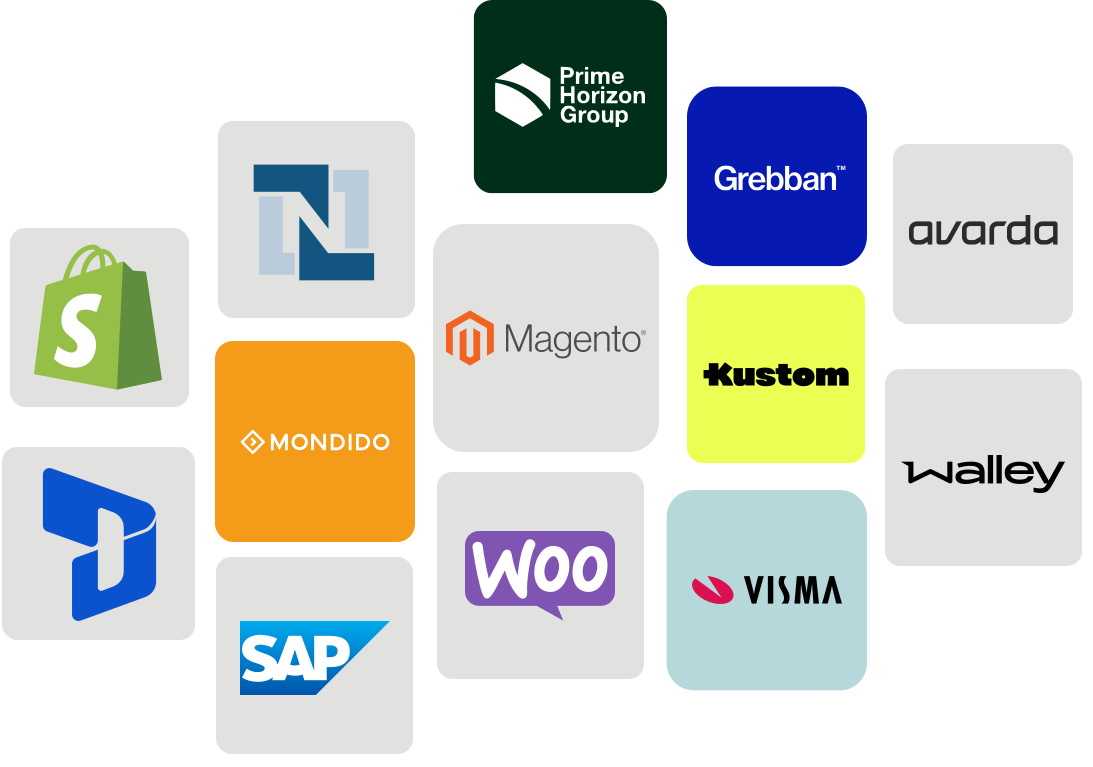
 

Logos of ecommerce, ERP and WMS platforms that connect to nShift


Ecommerce & OMS

Syncs with platforms like Shopify, Magento, WooCommerce, and custom setups. Connects return requests to order data and automates refund triggers.
 

ERP & WMS

Real-time updates for restocks, credits, and inventory, with no manual re-entry.
 

Carriers & labels

Return labels and drop-off options through the nShift network of 1,000+ carriers, where your carrier agreements support them.

Analytics & BI

Export return data by SKU, region, and customer segment to tools like Power BI and Qlik, and turn patterns into actions.
The Ecommerce Returns Opportunity report by IMRG and nShift, on a tablet

Report

The ecommerce returns opportunity

What 1,000 UK shoppers expect from returns: which charges they accept, how many would take an exchange instead of a refund, and what a poor return costs you on the next order.

Research by IMRG for nShift, 2026

Real results

nShift has significantly improved our post-purchase experience which has reduced calls to our customer service team, improved our brand perception and boosted our bottom line. 

Haroun Saleemi

Head of e-commerce, QUIZ

We’ve made returns part of a seamless omnichannel customer experience with increased returns control and insights. 

Robin Visser

Omni Channel Business Development Manager, Hunkemöller

Our customers easily print their email or web-generated return label and we handle returns more efficiently at the warehouse. 

Jonas Larsen

E-commerce Manager, Friluftsmagasinet

Frequently asked questions about nShift Returns

What is nShift Returns?

nShift Returns is a returns management platform for ecommerce. Customers register returns and claims in your branded portal, while your team sets fees and return windows and follows each return through to the refund.

Can I charge different return fees, or give different return windows, for different orders?

Yes. In Settings, under Rule engine, you build rules from conditions on the order: order value, order date, order ID, refund method, or a custom field you send with the order such as customer group or store. A matching rule sets the return fee, the return shipping fee or the return period, and the same for claims and exchanges. Rules apply to the markets and the flow you choose, and when two rules match, the one higher in the list wins.

How do customers start a return?

In your branded returns portal, on your own URL. They log in with the order number and email address, or through a link in an email, pick the items, choose return, exchange or claim, give a reason, and select how to send the item back and how they want to be refunded. Language and currency follow the market.

What happens once a return is registered?

The warehouse is told a return is on its way and scans it in on arrival. With automated refunds, receiving the item triggers the refund or credit note in your ERP or ecommerce platform. Exchanges create the new order in your external system. If you prefer, the WMS API processes the return on the warehouse scan.

Can a customer exchange an item instead of returning it?

Yes, on the Premium plan. The customer picks another size, color or product. nShift Returns checks stock, VAT and discounts and creates the exchange order in your external system.

Can I review a return before it is approved?

Yes. Per market, you decide whether returns are approved automatically, whether only claims need a manual review, or whether every return does. Most useful for high-value items and international shipping.

Which systems does nShift Returns connect to?

Orders come in through the Push API, or automatically from nShift Ship, Transsmart and Delivery with no separate integration. Return orders, summaries and refund status go out through the Pull API, and the WMS API updates returns from the warehouse. Return data exports to BI tools such as Power BI and Qlik. With nShift Checkout connected, customers get the same delivery options for the return as they had at purchase.

Which shipping options can customers use to send an item back?

The options you configure per market, at the prices you set: mail, courier pickup, lockers and in-store. QR-code and label-free returns depend on the carrier service.

Is there help inside the product while I set it up?

Yes. nShift Companion is built into the Returns portal. Ask how to set up a market, a return option or a rule, and get an answer in plain language, drawn from Returns documentation. Guidance from Companion is advisory: you make the change.

Can I run returns for several countries from one account?

Yes. Each market covers one or more countries that share a currency and a return policy, and it can offer several languages. Customers use the portal, and get their emails, in the language they pick. With automated market routing, each incoming order goes to the right market based on the customer's country. To add a market, contact nShift Customer Service.

Can customers return an online order in one of our stores?

Yes, if you offer it. Return to store is one of the return options you can set per market, and the Pull API passes on which store the customer chose, so you can see in your own systems where each item is coming back to. Hunkemöller saw a 15% increase in in-store returns, as opposed to returns to the warehouse, and each one is a chance for store staff to help the customer and sell again.

Can I refund part of an item's value instead of the full amount?

Yes. In the admin, open the return order and edit the item price: take off a percentage or a flat amount, up to the item's full value, then process the refund. Use it when a customer keeps a damaged item, or when you resolve a claim another way, such as a repair. You can also change the return fee and the shipping fee after the return is created.

Which retailers use nShift Returns?

Fashion retailers across Europe, including Hunkemöller, based in the Netherlands, and Quiz in the UK. Hunkemöller's warehouse teams now see expected return volumes days in advance, and Quiz expects to save up to 30% of staff time with digital, paper-free returns.

Latest nShift Returns articles from our blog