Solved webinars · On demand
Solved in 2026.
Ideas to take into 2027.
See the delivery problems that take up your team's time fixed on screen, in 30-minute sessions you can watch on demand. Pick the ones that fit your 2027 plans and get complimentary access to the bonus guides and slides.
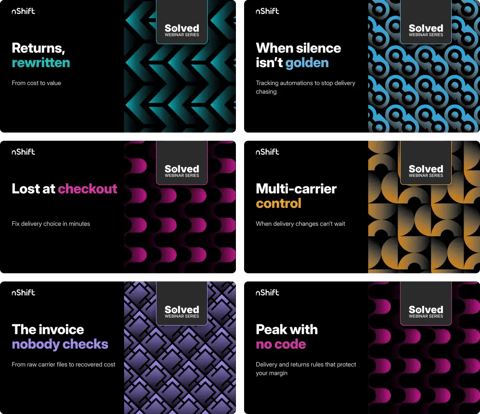
Jump to the session you need, or follow them in order to see how one led to the next.February · ReturnsMarch · TrackingApril · CheckoutJune · CarriersSeptember · Freight invoicesNovember · Peak
February
ReturnsEpisode 1
Returns, rewritten: From cost to value
We started 2026 where peak ends: with the returns. In February, while retailers were working through the returns from peak, we built a returns portal live on screen, one where shoppers start their own return and give a reason for it.
Watch the build from start to finish, and see how to:
- Check your policy against eight returns trends for 2026
- Set return fees and choose which refund methods to offer
- Spot serial returners in each customer's order and return history
Presented by
 Jyo Saikia
Product Specialist Director Thomas Bailey
Product Innovation Lead Josh Barber
Product Integration Expert
With the recording: the slides and the Fix the Returns guide.
We said we'd follow the parcel further, into tracking.
March
TrackingEpisode 2
Silence isn't golden: Three tracking automations to stop delivery chasing
In March, we did. A parcel that goes quiet is a "where is my order?" call waiting to happen, so we set up the alert that tells the customer first. Aleksandar Milovanovic summed it up: the system is working for you.
Watch the alert being set up, and see how to:
- Put your own brand on the tracking page
- Map each carrier's scan events to the same plain statuses
- Send updates by email, SMS or digital wallet
Presented by
- Jyo Saikia
Product Specialist Director  Aleksandar Milovanovic
Product Specialist- Thomas Bailey
Product Innovation Lead
With the recording: the slides and the Own the Tracking guide.
In that session, we called out where the journey starts, and turned our attention there.
April
CheckoutEpisode 3
Lost at checkout: Fix delivery choice in minutes
In April we went back to where the order starts: the checkout, where every change to delivery options still waited on a developer. We built a checkout in under ten minutes and tested two versions side by side.
Watch the build and the side-by-side test, and see how to:
- Add pickup points and lockers to a delivery option
- Price delivery by basket value with a rule
- Get a summary of your setup and suggested improvements from Companion, the AI assistant in Checkout
Presented by
 Anna Norstedt
Checkout Product Manager- Josh Barber
Product Integration Expert
With the recording: the slides and the Win at Checkout guide.
Behind each delivery option there's a carrier moving the parcel.
June
CarriersEpisode 4
Multi-carrier control: When delivery changes can't wait
In June, straight out of the DELIVER Europe event, where team after team named IT as the bottleneck, Gary Carlile switched carrier rules with no IT ticket.
Watch the carrier rules change on screen, and see how to:
- Reallocate shipments when a carrier drops below its SLA
- Compare carriers on a scorecard before you keep, scale or replace one
- Add a carrier service for a new market and print its labels
Presented by
 Gary Carlile
EVP Customer Growth Greg Mannix
Enterprise Director
With the recording: the slides and the Delivery Control Gap field guide.
That session's brief listed one chore still done by hand: checking the freight invoices.
September
Freight invoicesEpisode 5
The invoice nobody checks
Next, in September we checked a freight invoice, line by line, with the dispute evidence gathered for you.
Follow that invoice from upload to dispute, and see how to:
- Put each invoice line through seven checks against your contracted rates and the shipment record
- Review the errors by value, largest first
- Track each dispute to its outcome and see what you recovered
Presented by
 Pieter Schalk
Freight Audit Expert Luc Altorf
Delivery Management Expert
With the recording: the slides, the Freight Invoice Audit Guide and answers to six questions from the session.
The invoice is one of five moments where an order can lose margin.
November
PeakEpisode 6
Peak with no code: Set delivery and returns rules that protect your margin
In November, our last episode of the year, we ran one Black Friday order through all of it, from checkout to a return in January, and pointed back to the September session for the invoice that lands weeks later. Nobody had to remember to switch the free delivery offer off.
Follow the order from checkout to return, and see how to:
- Schedule a Black Week delivery offer to start and end on set dates
- Pause a delivery option while a carrier's service is unreliable
- Get missed-scan alerts that skip weekends
- Extend the return window for gifts and make returns free above an order value
Presented by
 Sophie Jonsson
Product Marketing Manager- Josh Barber
Product Integration Expert
With the recording: the slides, two reports (The shape of peak and The Ecommerce Returns Opportunity) and answers to five questions from the session.
Try it yourself
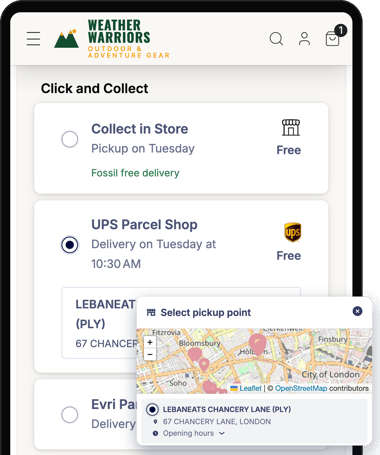
Place an order in our demo store
Weather Warriors is a fictional outdoor shop built on nShift. Choose a delivery option at checkout, follow the tracking and start a return, the way your shoppers would. Orders and payments are simulated.
Questions about the Solved sessions
What is Solved?
Solved is nShift's webinar series on delivery problems and how to fix them. Sessions last 30 minutes and show the fix being set up on screen.
Are the recordings free to watch?
Yes. Fill in a short form and the recording opens right away, with the slides and that session's guide or report.
Do I need to be an nShift customer to watch?
No. You can sign up and watch whether or not you use nShift.
Which session should I watch first?
Can a 3PL set tracking notifications separately for each of its clients?
Asked in the March session. Yes. In a 3PL setup, notifications can be set up separately for each client.
Can we use our own stores as pickup locations at checkout?
Asked in the April session. Yes, if you offer click and collect. Your stores can appear as pickup locations alongside carrier pickup points in your nShift Checkout setup.
If several carriers qualify for an order, can I route it to the cheapest?
Asked in the June session. Yes. As well as splitting orders between carriers, you can set the allocation to favour the cheapest price or the fastest option among the eligible carriers.
Do we need to book shipments through nShift to use nShift Audit?
Asked in the September session. No. Shipments booked elsewhere can be sent to nShift through an API. Without your contracted rates loaded, there is nothing to compare prices against, so you start with five of nShift Audit's seven invoice checks and add the price checks as your rate cards go in.
Can we make peak changes without a developer?
Asked in the November session. Yes. Once nShift is connected to your store, delivery options, tracking alerts and return rules are changed in settings, with no code release. Teams on a peak code freeze can still make them.